The short version
- AI assistants make many changes fast. The code survives, but the reasons behind it usually do not.
- A useful record answers five things: what was asked, why this approach, what changed, how it was tested and who approved it.
- You do not need a new system. Good commit messages, pull request templates and short decision records cover most of it.
- The assistant's own transcript adds the exact request and its stated reasoning, but it is not a sign-off.
Why you will need it
A developer asks an AI assistant to "make the checkout faster". An hour later, eleven files have changed, a cache has appeared and a retry rule has been loosened. The tests pass and the change ships. Nobody writes down why the retry rule moved.
That is fine, until the day someone asks. It tends to come up in five situations:
- Code review. A reviewer sees what changed but not what the author asked for. Without the request, they cannot tell whether the change did what was wanted or just something plausible.
- Client handover. An agency hands a product to a client, or a founder hands it to a new engineer. The new owner inherits code and has to guess the intent. Our guide on hiring a team overseas covers who owns the code. Records help the owner understand it.
- Audits and customer questionnaires. Frameworks such as SOC 2 and ISO 27001 both include change management: changes should be controlled and you should be able to show evidence. How an auditor treats AI-assisted changes is for your auditor to say, but "we can show the request, the review and the approval for each change" is a strong place to stand. The AICPA publishes the SOC 2 Trust Services Criteria, and ISO publishes ISO 27001. Both are sold documents, so read the exact wording with your auditor.
- Onboarding. New hires learn a codebase faster when they can read why it looks the way it does.
- Incident review. When something breaks, the first question is what changed. The second, and harder, question is why someone changed it.
The hard part is that AI assistants blur authorship. A human wrote a one-line request, the assistant made dozens of edits and a human may have skimmed the result. Our guide on vibe coding and safety covers why a human review matters. This guide covers how to leave evidence that it happened.
What the security guidance says. NIST's Secure Software Development Framework (SSDF, SP 800-218, February 2022) lists practices that fit this need: use version control to track all changes with accountability to the individual account, have the code owner review and approve changes made by others, and archive provenance data for each release. It was written for software in general. NIST's companion document, SP 800-218A, covers developing AI models, not the use of AI assistants to write code. We also checked the UK NCSC's developers collection and CISA's Secure by Design page: neither speaks to tracing AI-made changes directly, though NCSC does name version control and peer review as ways to manage risk.
What to record
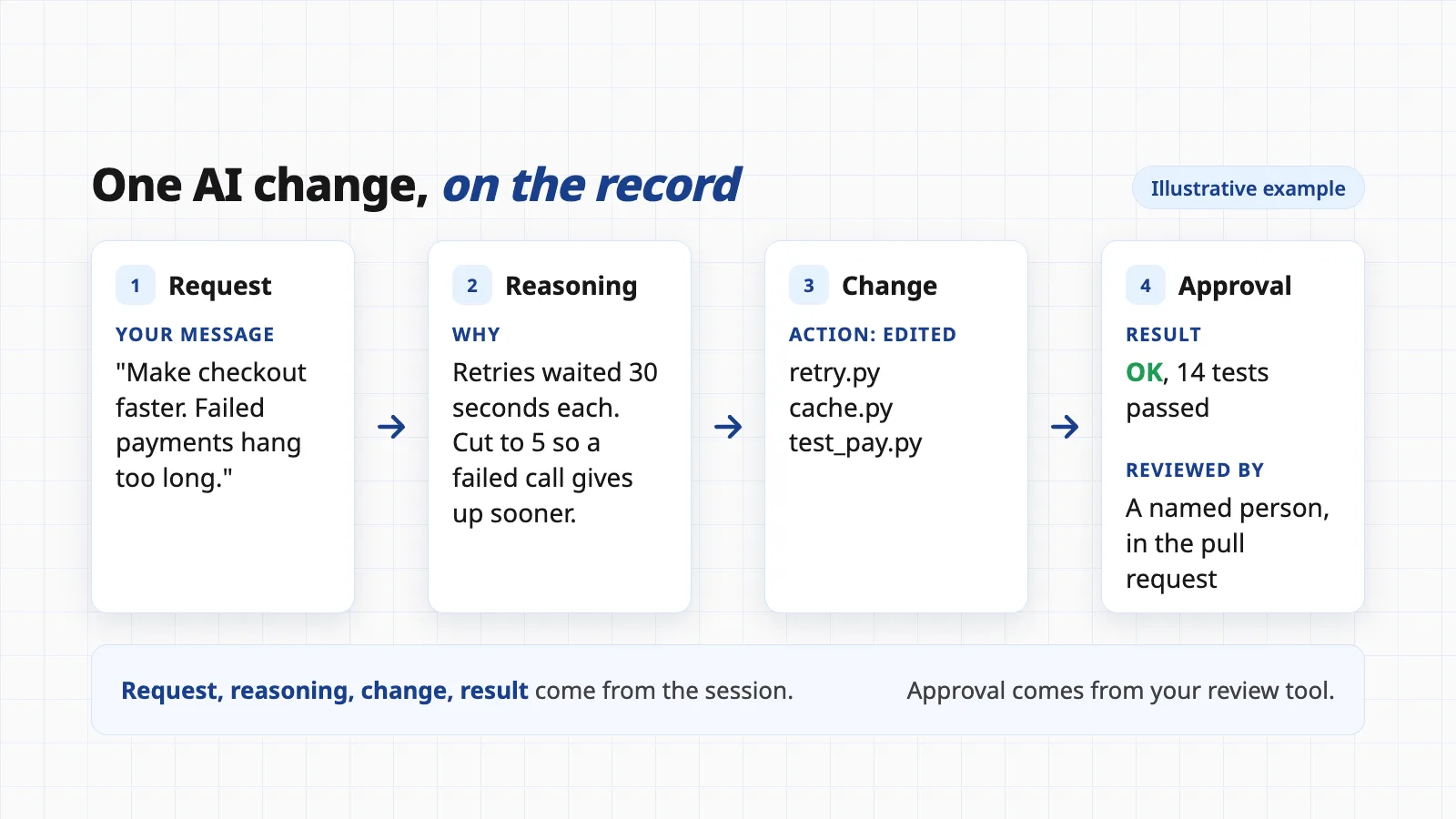
A good record is short and answers the questions a stranger would ask. For each meaningful change made with an AI assistant, aim to capture these six things.
- The requestWhat the person actually asked for, in their words. Intent is the first thing lost.
- The reasoningWhy this approach over the alternatives. One or two sentences is enough, and "we chose X because Y" beats a long essay.
- The changeWhich files, services or settings were touched. Version control already gives you the diff. Add the part a diff cannot show, such as a config changed on a server.
- The checksWhich tests ran and passed, and anything a person checked by hand. NIST's SSDF says to record and triage issues found in review or analysis in the team's workflow or issue tracker.
- The approvalWho reviewed it and said yes. This is the field transcripts cannot fill, so it comes from your pull request or review tool.
- The toolWhich assistant and, where you can, which model. Handy when behavior changes between versions.
Keep secrets out of the record. Chats and transcripts can contain keys, tokens and customer data pasted in by accident. Strip them before sharing a record, and keep them out of prompts where you can.
Formats that already exist
You do not need to invent a template. Four formats are in wide use, and each suits a different size of decision.
Commit messages
The cheapest record. The Pro Git book says the first line should be a short summary of about 50 characters, followed by a blank line and a fuller explanation. The Git project, it says, expects that explanation to include your motivation for the change and contrast it with previous behavior. That is exactly the "why". The Conventional Commits convention adds a predictable shape: a type and description line, an optional body and optional footers, which makes messages easy to scan and filter.
Pull request descriptions
Where the review and approval live. GitHub lets you add a pull request template so contributors see its contents automatically in the description box. A template with four prompts is enough: what was asked, what changed, how it was tested, and whether AI assistance was used. The approval itself is recorded by the review tool.
Architecture decision records
For bigger choices. Michael Nygard proposed them in a November 2011 post. Each one has a short noun-phrase title and four parts: status, context (the forces at play), decision (the response to those forces) and consequences (the resulting situation after the decision). His rule of thumb: the whole document should be one or two pages. The adr.github.io site collects the idea, templates and tooling around keeping a record of each architectural decision and its rationale. Use one when a decision is expensive to reverse, such as choosing a database, an authentication approach or a payment provider.
Session transcripts
The full conversation with the assistant. They are the only place that holds the exact request and the assistant's running reasoning. They are also long, informal and unreviewed. Treat them as source material.
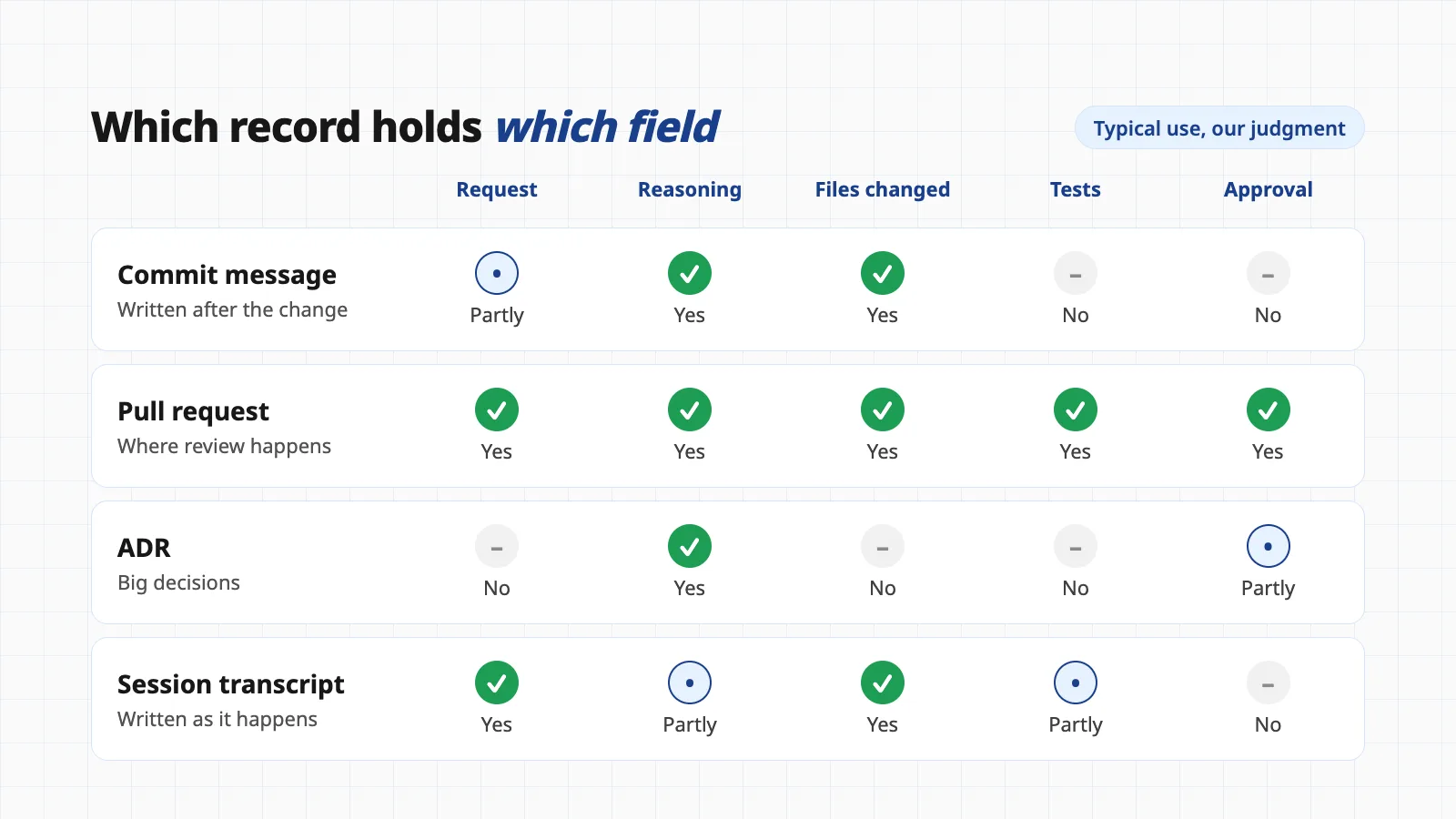
No format covers everything, which is why most teams combine them: the commit explains the change, the pull request carries the review, an ADR covers the big decisions, and the transcript backs them up.
Related guideYour AI agent just did something nobody asked for.Seven guardrails for agents that act on their own, including limits and logs.What a transcript adds, and what it does not
Commits and pull requests are written afterward, from memory, by someone in a hurry. An assistant's transcript is written as the work happens. It holds the original request, the assistant's stated reasons, the commands it ran and what came back. That is a rare thing in software: a contemporaneous record of intent.
It has limits too. The assistant's stated reasoning is what it said, which is useful but not proof of what is true, so verify claims that matter. A transcript does not show a human approval. And it can disappear: Claude Code's cleanupPeriodDays setting defaults to 30, and it deletes older session transcripts in a background sweep without showing a message. If you want them for an audit, archive them.
This is the gap Evenfall was built for. It is a small tool we make that saves every Claude Code session on your own computer, with keys and passwords swapped for a placeholder before storage. It then links each deploy, scheduled job or file write to the request that caused it, the reason the assistant gave (when it states one, for example in a "Why:" line) and the result. You can ask for the trace of a single action and read request, reasoning, action and result together.
Be clear about what that is. It works with Claude Code on a Mac. It records what happened in the session, so it can only record a reason if one was stated. It does not record test results as a separate field, and it is not an approval system: a person still reviews and signs off through your normal pull request process. It makes no calls to any AI service and keeps the archive in a folder you own. It is free to use on your own computer, with plans for sync, backup and teams by enquiry.
Whatever tool you use, the test is simple. Pick a change from three months ago and ask: can I find who asked for it, why it was done this way and who approved it, in under ten minutes?
A starter routine
Start small. This takes a team about an hour to set up.
- Step 1Add a pull request template Four prompts: what was asked, what changed, how it was tested, whether AI assistance was used.
- Step 2Agree a commit habit Summary line, then a body that says why. Ask the assistant to draft it, then edit it yourself.
- Step 3Write an ADR for each hard-to-reverse decision One page, using Nygard's headings.
- Step 4Keep transcripts for important work Raise the retention period or archive them, and keep secrets out.
- Step 5Review the sample Once a quarter, trace three random changes and see whether you can explain them.
None of this slows a team down much. Writing a sentence about why takes seconds. Reconstructing the reason after an outage takes days.
Questions people ask
What is an architecture decision record?
A short document that captures one decision and the reasons behind it. Michael Nygard described the idea in a November 2011 post: a title, a status, the context, the decision and its consequences, kept to one or two pages so people actually read it.
Do I need a separate record if I already write good commit messages?
Often a good commit message is enough for a small change. Git's own guidance says the body should explain your motivation for the change. Use a longer record when the decision is hard to reverse, affects several parts of the system, or someone will ask about it later.
Is an AI assistant's chat history a decision record?
It is raw material, not a finished record. It shows the exact request and the assistant's stated reasoning, which commits rarely capture. It does not show who reviewed and approved the change, and it can be long and noisy. Summarize the decisions that matter into a commit, pull request or ADR.
Will SOC 2 or ISO 27001 require this?
Neither names AI-assisted code specifically as far as we found. Both expect changes to be controlled and evidenced, and your auditor decides what evidence is enough. The standards' full text is sold by their publishers, so check the exact wording with your auditor.
How long should we keep the records?
Keep them as long as the system lives and for any period your contracts or regulators set. Note that Claude Code deletes its local session transcripts after 30 days by default unless you change the setting, so copy or archive them if you want them longer.
Want every Claude Code session on file?
Evenfall keeps your Claude Code sessions on your own computer and links each deploy or file change to the request, the stated reason and the result. It is free to start; plans for sync, backup and teams are by enquiry.
See EvenfallSources
- Documenting Architecture Decisions
- Architectural Decision Records
- Pro Git: Contributing to a Project (commit guidelines)
- Conventional Commits 1.0.0
- Creating a pull request template for your repository
- SP 800-218: Secure Software Development Framework (SSDF) Version 1.1
- SSDF Version 1.1 (full text, practices PS.1, PS.3 and PW.7)
- SP 800-218A: SSDF Community Profile for generative AI and dual-use foundation models
- Developers collection
- 2017 Trust Services Criteria (with revised points of focus, 2022)
- Claude Code settings reference: cleanupPeriodDays
- Our guide: vibe coding and safety
This guide is general information, not legal, audit or compliance advice. Standards such as ISO 27001 and SOC 2 are interpreted by your auditor, and we have not quoted their paid text. The comparison and record layout in the images are illustrative examples, not real project data.