The short version
- Claude Code already saves every session on your computer, and
claude --continueorclaude --resumereopens one. - A new session,
/clearor compaction drops the conversation. Only CLAUDE.md and memory files carry over. - A six-line handoff note in a project file is the cheapest way to carry the thread across a break.
- Evenfall adds a local, searchable archive that outlasts the default 30-day cleanup.
What Claude Code already keeps
More than most people think. Anthropic's documentation says Claude Code saves your conversation locally as you work. Each message, tool use and result is written to a plaintext JSONL file (one JSON record per line) at ~/.claude/projects/<project>/<session-id>.jsonl. The <project> part is your working directory path with every non-alphanumeric character replaced by a dash, so a session started in /Users/ana/shop lands in a folder named -Users-ana-shop.
That file is what makes these commands work, all from Anthropic's CLI reference and session guide:
claude --continue(orclaude -c): reopen the most recent session in the current directory.claude --resume(or-r): open a picker of sessions, or pass an ID or name, as inclaude --resume auth-refactor.claude -n "auth-refactor"at launch, or/rename auth-refactorinside a session: give it a name you can resume by./resume: switch to a different session from inside Claude Code.--fork-session(or/branch): copy the history into a new session ID and leave the original unchanged.
Resuming reopens the session under the same ID and appends new messages. It restores the conversation history, the model, and the permission mode in most terminal cases. It does not restore every launch flag: if the session depended on --mcp-config, --settings, --plugin-dir or directories added with --add-dir, pass them again.
Two files carry knowledge across sessions without any resuming. CLAUDE.md holds instructions you write, and auto memory holds notes Claude writes for itself. Both load at the start of every session.
Two cautions. By default Claude Code deletes transcripts older than 30 days (the cleanupPeriodDays setting). And the files are plaintext, not encrypted: if a tool reads a .env file or a command prints a credential, that value is written to the transcript.
What gets lost
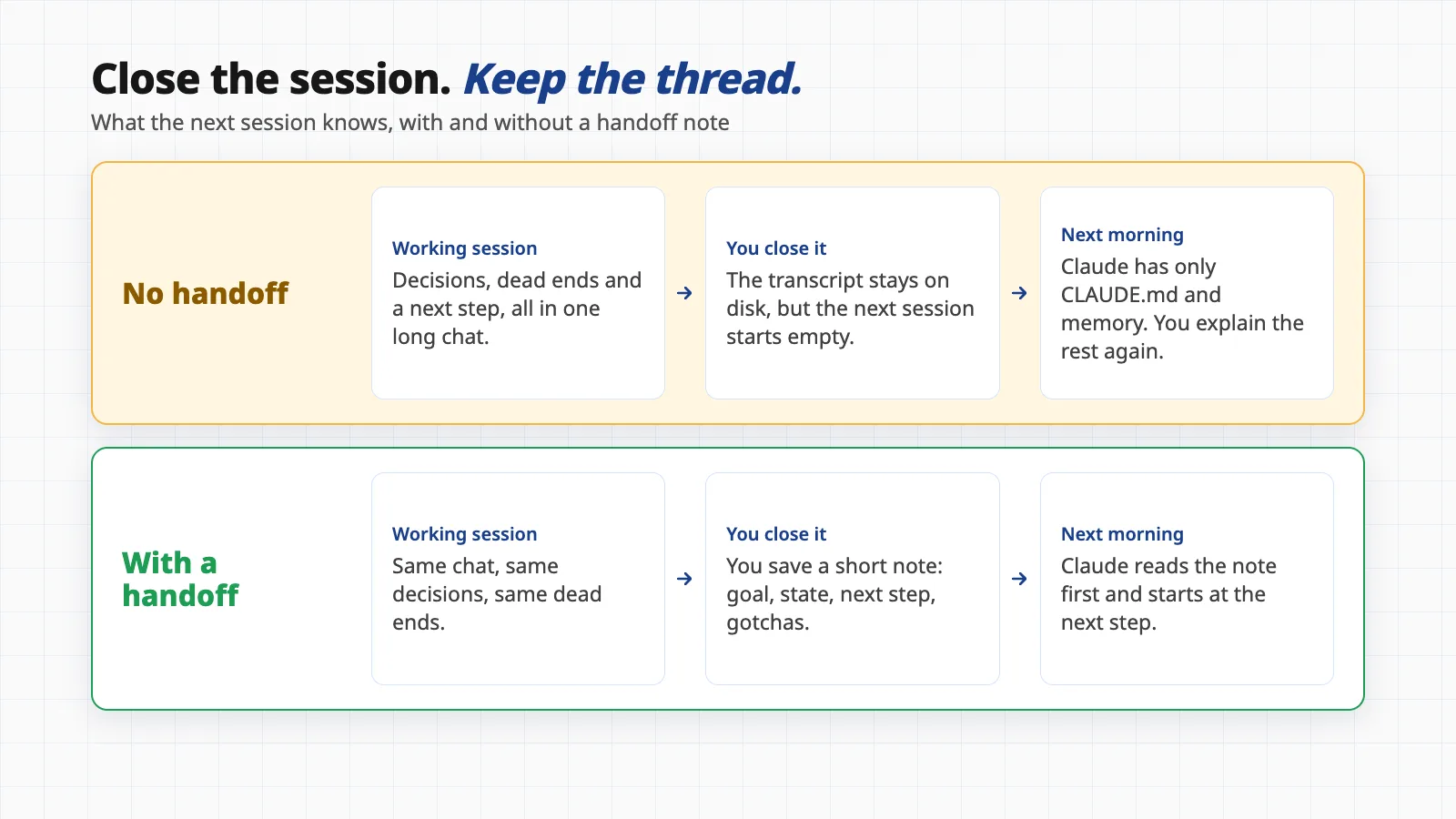
The picture below shows the difference. Anthropic is direct about this: sessions are independent, and each new one starts with a fresh context window without the history of earlier ones. So three things quietly drop the thread.
- A new session or
/clear. The old conversation is saved and you can/resumeit, but Claude no longer sees it. The reasons behind decisions, the dead ends you ruled out and the state of half-done work are in that old chat, not in the new one. - Compaction. When the window fills, Claude Code replaces the conversation with a summary. Anthropic says the summary keeps your requests and key code snippets, but "detailed instructions from early in the conversation may be lost."
- A long break before resuming. Resuming works, but the prompt cache has expired, so the whole saved conversation is processed again at full price. Claude Code can show a "Resume this conversation?" dialog estimating the share of your five-hour usage limit it would use, and lets you start a new conversation instead. Our guide on why long Claude Code sessions get expensive explains why.
Ending a session, step by step
This is the sequence we use. Steps one to four take about two minutes.
- Step 1Stop at a clean point. Finish the edit, or tell Claude exactly where you stopped. Check that tests, a deploy or a background command are not still running.
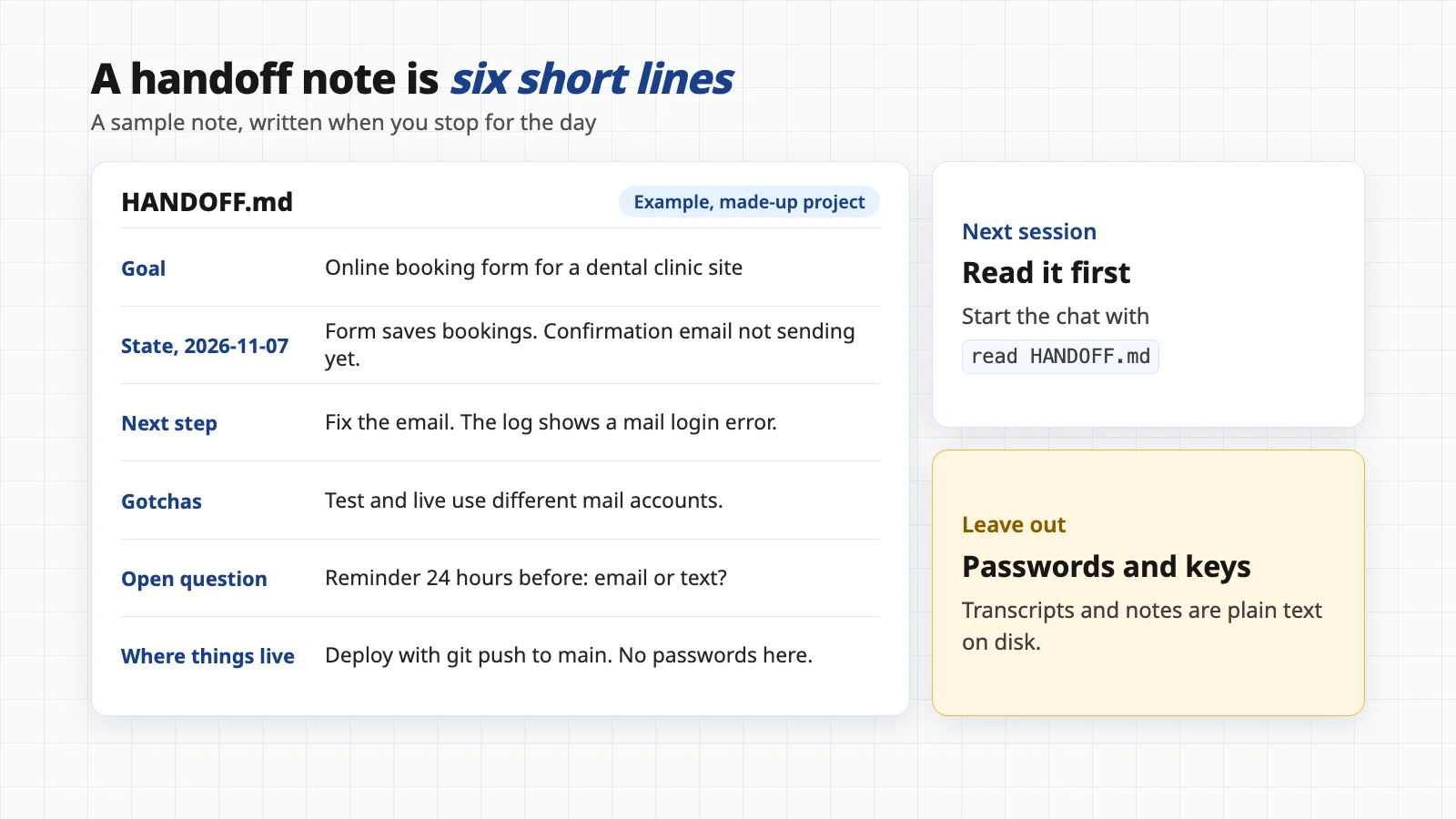
- Step 2Ask for the note. Type something like: "Write HANDOFF.md in this project: goal, state today with the date, next step, gotchas, open questions, where things live. No passwords or keys." The file name is our convention, not a Claude Code feature.
- Step 3Read it and fix it. Claude can sound sure about things it only assumed. Correct anything wrong, delete anything private, and make sure the next step is one concrete action.
- Step 4Name the session. Run
/rename shop-checkoutso you can find this chat later. Then/clearif you are moving to other work, or simply exit. - Next timeChoose how to return. Need the exact words of yesterday's chat? Run
claude --continuein the same folder, orclaude --resume shop-checkout. Coming back after days, or the chat was long? Start a new session and say "read HANDOFF.md, then continue".
When in doubt after a break, the fresh start with a note is usually the cheaper and cleaner choice. Resume when the precise detail of the old conversation matters.
Two more habits help. If you work in several folders or branches, remember that sessions are tied to a directory, so claude --continue only finds the latest one in the folder you are in; /resume lets you widen the picker to other worktrees or every project. And if you want a copy of each transcript before the 30-day cleanup, Anthropic's guide points out that a SessionEnd hook receives the transcript path and can archive the file when a session ends. That is a few lines of script you own, and the simplest do-it-yourself alternative to a tool.
What to write in a handoff note
Keep it to one screen. A note nobody reads, or that is out of date, is worse than none. These are the fields that earn their place:
- GoalOne sentence on what you are trying to achieve and why it matters.
- State, with today's dateWhat works, what does not, and the last commit or change. The date tells tomorrow's reader how stale it is.
- Next stepOne concrete action, small enough to start in the first minute.
- GotchasThings that cost you time: the staging account that differs from live, the command that needs a flag, the test that fails on its own.
- Open questions and decisionsWhat is undecided, and what you decided and rejected, with the reason. The rejected options are what stop Claude suggesting them again.
- Where things liveFolders, services and how you deploy. Names and locations only.
- No secretsNever put passwords, keys or tokens in the note. Say where they are kept instead.
Where to keep it? A file in the project root works, and so does a memory file. Since CLAUDE.md loads every session, keep it for durable rules and conventions, and keep the changing state in the handoff note, so the always-loaded file stays short. If a task involves an AI agent that acts on live systems, the note is also a useful record of what it was allowed to do; see our guide to running AI agents safely.
Where Evenfall fits
Handoff notes depend on you remembering to write them, and on Claude Code's own transcripts surviving. Evenfall, a Geneki product, covers the gaps. It runs on your computer, keeps a copy of every Claude Code session in its own archive (so the 30-day cleanup does not take your history with it), and replaces passwords and keys with a placeholder before storing anything. It makes no calls to any AI service and sends nothing anywhere. It is free to start; plans for syncing between computers, backup and teams are by enquiry.
The commands below exist in Evenfall's command-line tool today:
evenfall find "booking email": search all saved sessions by keyword. Each hit has an ID.evenfall show <id>: read the full text of a hit and its neighbours.evenfall handoff --project booking: draft a note from what changed since your project memory file was last edited. You can add--sinceto set the start.evenfall doctor: check that saving is working and that nothing has fallen behind.
At the start of a session, an Evenfall hook prints a short card for the project (systems used, how things are usually done, recent actions and their reasons), and Claude can run evenfall find before it asks you to explain. The card also warns when a memory file is stale.
The draft is built from recorded actions, so it is factual. In our own run on 2026-11-07 it opened with "Draft update for the evenfall memory, 2026-11-06 to 2026-11-07 (3 outward actions). Edit before saving; keep only what is non-obvious." It then listed each push and deploy with the request behind it and the commit message, and asked us to add the commit we ended on, anything that failed and why, and open items.
Honest limits. Evenfall never writes your memory or note files; it drafts, and you edit and save. The draft covers outward actions such as deploys and file changes, not your unfinished thinking, so the goal, next step and open questions are still yours to write. It works on a Mac with Claude Code, reads a transcript format that Anthropic says can change between versions, and search works best with keywords rather than vague questions.
The low-effort routine is the one in section three: write the note, then /rename and /clear. Evenfall makes that safer because the full conversation is still searchable, not just the part you remembered to write down.
Questions people ask
Where does Claude Code store my sessions?
Anthropic's documentation says transcripts are stored as plaintext JSONL files at ~/.claude/projects/
What is the difference between claude --continue and claude --resume?
claude --continue reopens the most recent session in the current directory. claude --resume opens a picker, or resumes a specific session by ID or name, for example claude --resume auth-refactor. Both reopen the session under the same ID and add new messages to it; --fork-session makes a copy under a new ID instead.
Does /clear delete my conversation?
No. Anthropic's session guide says Claude Code saves the previous session when you run /clear, and you can return to it with /resume. The new session simply starts with an empty context, so Claude no longer sees that conversation.
Is it better to resume the old chat or start fresh with a note?
Resume when you need the exact detail of a recent conversation. Start fresh with a handoff note when the old chat is long or you are coming back after a break: Anthropic notes that resuming a large conversation after a long break can cost a lot, because the prompt cache has expired and the whole history is processed again.
Can I keep secrets out of transcripts and notes?
Not automatically. Anthropic says transcripts are plaintext and anything a tool reads or prints, such as a .env file, is written to them. Do not paste passwords or keys into chats or handoff notes, and consider permission rules that deny reads of credential files.
Never worry about closing a session.
Evenfall saves every Claude Code session on your own computer, lets Claude search it, and drafts a handoff from what changed. Free to start. Plans for sync, backup and teams are available on enquiry.
See EvenfallSources
- Manage sessions (accessed 2026-11-07)
- Explore the .claude directory: application data (accessed 2026-11-07)
- CLI reference (accessed 2026-11-07)
- Explore the context window: what survives compaction (accessed 2026-11-07)
- How Claude Code works (accessed 2026-11-07)
- Why long Claude Code sessions get expensive
General information, not advice. Commands and file locations are as documented by Anthropic on 2026-11-07 and can change between Claude Code versions; run claude --help and check the current documentation.