The short version
- LLMjacking means stealing a cloud login or an AI key to run AI models on someone else's account. The account owner pays.
- Researchers have tracked it since May 2024. In November 2026 Google reported charges above $100,000 in a single day in individual incidents, and cheap resale gateways for stolen access.
- Entry is usually ordinary: a key in a public code repository, an exposed cloud login, a hijacked session.
- Defend in order: find keys, remove long-lived ones, limit what each can do, cap spend, alert, rotate. A budget alert alone stops nothing.
What LLMjacking is
An API key is a long secret password that lets software use a service and bills the owner for it. A large language model (LLM) is the engine behind chatbots and AI assistants. Cloud providers and AI companies sell access to LLMs by usage, so whoever holds your key can spend your money.
That is the idea behind LLMjacking, a term coined by Sysdig's Threat Research Team in May 2024. Attackers get hold of cloud credentials or AI keys, run models on the victim's account, and sometimes sell that access on. It is a cousin of cryptojacking, where thieves run other people's servers to mine coins. Here the stolen resource is AI model time.
Small businesses are not too small to matter. A key pasted into a shared document, a test script pushed to a public repository or a web app that ships its key to the browser all look the same to a thief. If you have read our guide to AI-built apps and launch safety, this is one of the main reasons that guide says never to leave secrets in code.
How an attack runs
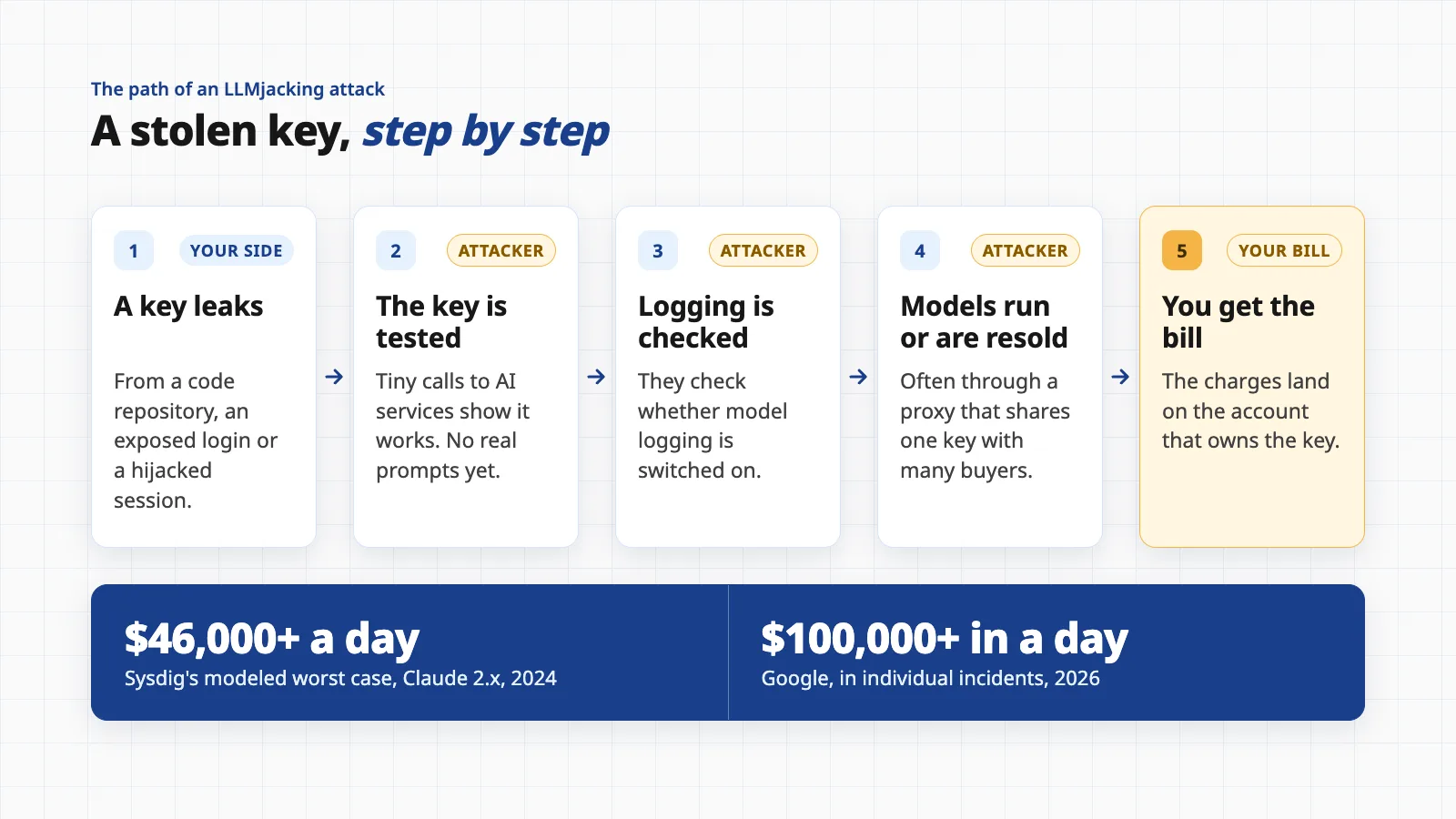
The picture at the top of this page follows the sequence Sysdig described in its first report. The steps below are what its researchers observed on Amazon Bedrock, AWS's AI service, in 2024.
- 1. A key leaks. In Sysdig's case, the credentials came from a system running a vulnerable version of the Laravel web framework. Google's 2026 report lists other routes: exposed or stolen cloud identity tokens, service account keys, GitHub access tokens, and AI keys harvested from public code repositories.
- 2. The key is tested. A script checked the credentials against ten AI services. Sysdig says no real prompts were run at this stage. Its researchers saw a request with an invalid setting, where the error that came back proved the key could reach the models.
- 3. The attacker checks whether you are watching. The attackers queried Bedrock's logging configuration, which Sysdig says is done to avoid detection when they run their prompts. In a later report Sysdig also saw attackers deleting that logging setting.
- 4. The models are used or resold. Sysdig observed an OpenAI reverse proxy, a tool that sits between customers and stolen keys, and noted it could let attackers manage access centrally and sell it.
- 5. The bill arrives. The charges are billed to the account that owns the key, usually without anything breaking, so nobody notices until the invoice.
Turning a model off is not a lock. Sysdig's September 2024 report notes that disabled models which need activation are not a security control, because an attacker with enough permission can enable them. Limit what the key is allowed to do instead.
What the reports show
Three sources give a fair picture. None publishes an average victim cost, so treat every number below as a case or an estimate, not a forecast for you.
- Sysdig's cost estimates (vendor-reported). In May 2024 Sysdig calculated that a victim using Anthropic's Claude 2.x on Bedrock could pay over $46,000 per day, assuming Bedrock's quota of 500,000 tokens per minute, four regions and list prices. In September 2024 it said the figure rises to over $100,000 per day with newer models such as Claude 3 Opus. These are modeled worst cases, not recorded invoices. The same report counted a tenfold rise in LLM requests during July 2024 and a doubling of unique attacker IP addresses over the first half of that year. In February 2026 Sysdig described a commercial marketplace selling stolen compute and API access.
- Microsoft's case against Storm-2139 (allegations). In December 2024, Microsoft's Digital Crimes Unit filed a lawsuit in the Eastern District of Virginia against ten unnamed defendants. Microsoft says members of the group "exploited exposed customer credentials scraped from public sources" to get into accounts, built tools to bypass the guardrails of generative AI services including Azure OpenAI, and resold the altered access. A court granted a restraining order that let Microsoft seize a website the group relied on, and in February 2025 Microsoft named four defendants. These are Microsoft's claims in litigation.
- Google's report (3 November 2026). Google Threat Intelligence Group and Mandiant say the dominant way in was exposed or stolen cloud identity tokens, and that actors also validated AI keys found in public GitHub repositories with tiny test requests. They report fraudulent charges above $100,000 in a single day in individual incidents, and cumulative charges reaching $1 million at some organizations before access was cut off. They describe "LLM Mixers", gateways that proxy, aggregate and resell stolen access; one advertised an unlimited plan at about $60 a month, against $100 to $250 a month for a typical consumer subscription.
The common thread is that the thief rarely needs anything clever. What turns a leak into a six-figure bill is a key that can do too much, with no cap and nobody watching.
A defense plan, in order
The order matters. Finding keys comes first because you cannot protect what you do not know about, and caps come before alerts because an alert tells you after the fact. This plan is ours, built from the vendor documents and reports listed at the end. Where a setting is named, we checked it against the vendor's own documentation.
- 1. Find every key you haveSearch your code repositories, old branches, shared documents, chat history and build logs for keys. On GitHub, secret scanning runs for free on public repositories, and push protection blocks a push that contains a secret. GitHub says private repositories need GitHub Secret Protection. List every AI and cloud key in one place with an owner next to each one.
- 2. Remove long-lived keys where you canAWS recommends temporary credentials through IAM roles instead of long-term access keys, and keeping any long-term keys to cases that truly need them. On Azure, Microsoft documents keyless sign-in with Microsoft Entra ID and a setting that turns off key access on the resource. Check that your apps work with Entra ID first. For OpenAI, use a service account key per deployed app and set an expiration date.
- 3. Give each key the least it needsGoogle's advice is to deny all permissions that are not explicitly required, including access to cloud AI services. A server that only stores photos should not be able to call a model. One key per app and per environment means a leak in testing cannot touch production.
- 4. Put a ceiling on spend and speedSee the next section. This is the control that turns a disaster into an annoyance.
- 5. Turn on logs and alertsYou need to see who called which model, and you need to be told when spend jumps.
- 6. Rotate on a schedule, and instantly on a leakReplace keys regularly so a forgotten leak expires, and have a rehearsed way to swap one in minutes.
Step 4 in detail: guardrails on a key
These controls are parallel. You want as many as your provider offers, because each covers a gap in the others.
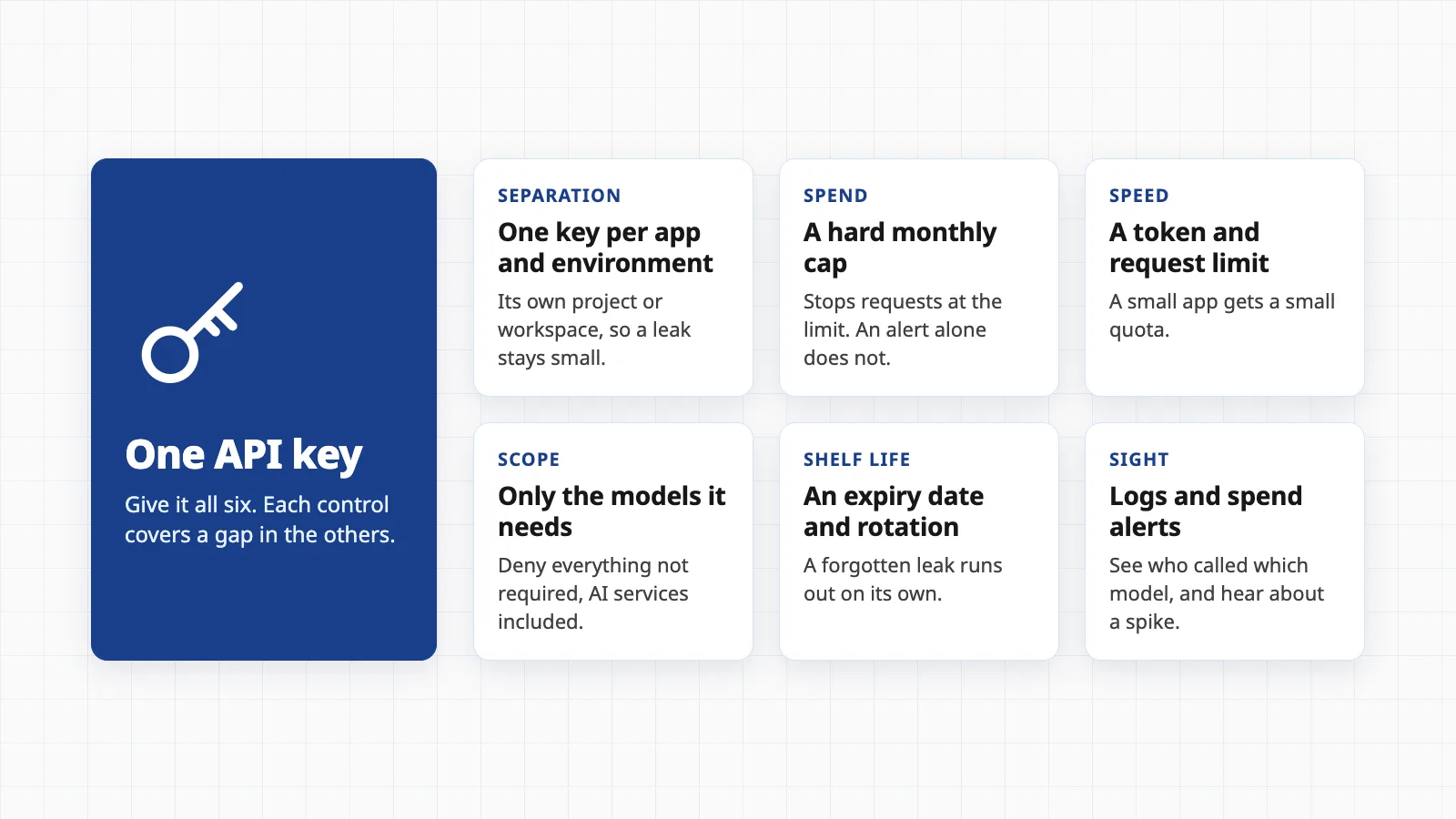
- A hard spend cap. OpenAI lets you set a monthly spend limit at organization or project level and turn on "Enforce a hard limit", after which requests fail with a 429 error. OpenAI notes that spend alerts do not enforce a cap and that enforcement is not instant, so recorded spend can slightly exceed the limit. Anthropic lets you cap monthly spending per workspace from the Workspaces page in the Console, and says you cannot set a limit on the default workspace, so create a separate workspace for each app.
- A speed limit. On Azure OpenAI, quota is set in tokens per minute for each deployment, so you can assign a small number to a small app. When a deployment reaches its limit, further requests get an HTTP 429 response. Amazon Bedrock has default token quotas for each model, visible in Service Quotas, and AWS says increases are not granted automatically.
- Budgets are alarms, not brakes. AWS Budgets can send an alert, and it can also apply an action such as an IAM policy that denies further provisioning, but its data is updated only up to three times a day and AWS warns your costs can pass the threshold before the notice arrives. Azure budgets evaluate against cost data every 24 hours and, in Microsoft's words, resources are not affected and consumption is not stopped, unless you wire the budget to an action group that runs automation you build.
Pick the cap before the incident. A spend limit that is too tight can switch off a real customer feature at the worst time. Set it to a level you could bear to lose for a month, and write down who may raise it.
Step 5 in detail: logs and alerts
- Bedrock invocation logging is off by default. AWS says model invocation logging is disabled until you enable it, and you can send logs to Amazon S3 or CloudWatch Logs. Each log entry includes the identity that made the call, which lets you group usage by who called. Sysdig saw attackers delete the logging setting, so alert on that change too.
- CloudTrail records the calls. AWS logs Bedrock calls such as InvokeModel and Converse as management events, which CloudTrail records by default, and you can see recent ones in Event history. Amazon GuardDuty can watch CloudTrail for suspicious Bedrock activity.
- Anomaly alerts. AWS Cost Anomaly Detection learns your normal spend and alerts on spikes. AWS says alerts may start within 24 hours of creating a monitor, and its individual alerts require an Amazon SNS topic. Pair it with a daily check of spend on every AI account, because money alerts are the slowest signal.
- Watch for tiny test calls. Google advises monitoring gateway and API logs for odd low-volume requests, such as those asking for a single token, since thieves use them to check that a stolen key works.
Step 6 in detail: rotation
For a planned swap on AWS, create a second key, move your apps to it, check the old key's "last used" date, deactivate the old key rather than deleting it right away, confirm nothing broke, then delete. OpenAI describes the same pattern: issue a replacement, update the workload, verify, revoke the old key. On Azure OpenAI, regenerate both Key1 and Key2 under Keys and Endpoints, because either one works. A leaked key is different: skip the waiting and deactivate it now.
Related guide10 things to switch off on your cloud bill this weekA checklist for AWS, Azure and Google Cloud, including the budgets and alerts that this plan relies on.The hour you see a surprise bill
Write this down before you need it. These steps follow the provider guidance above, in the order that limits damage fastest.
- First 10 minutesCut off the key. Deactivate or revoke the suspect key in the provider's console. On AWS, temporary credentials stay valid until they expire (up to 36 hours), and AWS says you must also change the permissions of the user or role, and can revoke a role's sessions, to stop them. If you do not know which key it is, start with the one showing the spike.
- Next 20 minutesLook for what the thief added. Open your audit log (CloudTrail on AWS) and search for new keys, new users or roles, changed permissions and AI services switched on. Google's report says to treat any unauthorized enablement of AI services as a critical security event, and notes one group created extra API keys inside victim projects.
- Next 20 minutesClamp the ceiling. Set a hard cap or a low quota on every AI account while you investigate. Check whether logging was changed or deleted.
- By the end of the hourTell the provider. Contact AWS Support, Microsoft or the AI company, share what you found and ask what they can do about the charges. If AWS has attached the AWSCompromisedKeyQuarantineV3 policy to a user, leave it in place: AWS says not to remove it and to follow the instructions in the support case it opened. Reduction of charges is the provider's call, not a right.
- Same dayReplace and rebuild. Create new keys with narrower permissions and caps, store them in a secrets manager rather than in code, and find out how the old key leaked before you move on. If you cannot tell, treat every key in that app as exposed.
None of this needs a security team. It needs a list of your keys, a ceiling on each one, and someone whose phone gets the alert. If you want a broader sweep for waste and open doors, our guides to AWS bill leaks and AI costs that overrun cover the ordinary, non-criminal ways cloud and AI bills grow.
Related guideYour AWS bill is leaking. Here is where.Ten everyday cloud leaks, from idle servers to log retention, and how to plug them.Questions people ask
What is LLMjacking?
It is the use of stolen cloud credentials or AI API keys to run large language models (LLMs, the technology behind chatbots) on someone else's account. The attacker uses or resells the access, and the account owner is billed for every request. Sysdig's Threat Research Team coined the term in May 2024.
How would I know someone is using my AI key?
Usually through money or logs. Look for a spend spike, usage from models or regions you never use, or calls at odd hours. Turn on usage alerts and model logging before it happens: on AWS, Bedrock model invocation logging is off by default, and AWS Budgets data refreshes only up to three times a day, so alerts can lag.
Does a budget alert stop the spending?
Usually not. Azure's documentation says budget notifications fire without affecting resources or stopping consumption, and OpenAI says spend alerts do not enforce a cap. OpenAI's hard spend limits and Anthropic's workspace spend limits do cap usage, though enforcement is not instant.
Is deleting the key enough after a leak?
It is the first step, not the last. On AWS, temporary credentials already issued from a key stay valid until they expire, and attackers may have created extra keys, roles or enabled services. Check your audit logs for new credentials and changes after you revoke.
Will my cloud provider cancel the charges?
There is no guarantee. AWS says it may attach a quarantine policy to an exposed key and that you should follow the instructions in the support case it opens. Whether charges are reduced is the provider's decision, so contact support the same day and keep your evidence.
Want a second pair of eyes on your cloud accounts?
We are building a cloud cost optimiser that starts with a read-only manual audit of your AWS, Azure or Google Cloud billing and setup, with a prioritised list of savings. It is in development; join the waitlist to be among the first.
Join the waitlistSources
- LLMjacking: Stolen cloud credentials used in new AI attack
- The growing dangers of LLMjacking: evolving tactics and evading sanctions
- LLMjacking: from emerging threat to black market reality
- Disrupting a global cybercrime network abusing generative AI
- The rise of LLMJacking: how threat actors monetize compromised cloud and model resources
- About secret scanning
- About push protection
- Security best practices in IAM
- Update access keys
- Monitor model invocation using CloudWatch Logs and Amazon S3
- Monitor Amazon Bedrock API calls using CloudTrail
- Quotas for Amazon Bedrock
- Managing your costs with AWS Budgets
- Getting started with AWS Cost Anomaly Detection
- Disabling permissions for temporary security credentials
- AWSCompromisedKeyQuarantineV3
- Tutorial: create and manage budgets
- Manage Azure OpenAI quota
- Configure keyless authentication with Microsoft Entra ID
- Spend limits
- Production best practices
- API keys and service accounts
- Workspaces
- Your AWS bill is leaking. Here is where.
- 10 things to switch off on your cloud bill this week
- Your AI pilot worked. Then the bill arrived.
This guide is general information, not security or legal advice. Dollar figures from Sysdig and Google are the researchers' own estimates or case reports, not averages. The Microsoft case describes allegations in a lawsuit. Vendor settings and limits change, so check your provider's current documentation before relying on any setting named here.