The short version
- Most launch-day security problems come from a short list: outdated or hijacked packages, secrets committed to code, missing HTTPS settings, weak sign-in, untested backups and an unpatched server runtime.
- OWASP's Top 10 for 2025 now lists Software Supply Chain Failures at number 3 and Security Misconfiguration at number 2, which are exactly the things a pre-launch pass can catch.
- Each check below takes minutes to an hour and points to an OWASP, CISA, NCSC or MDN page, so you can verify the advice yourself.
- A launch-day checklist at the end puts it all on one page. It will not make you unhackable, but it removes the cheap ways in.
Packages and supply chain: know what you are shipping
Almost every modern site or app is mostly other people's code. Your direct dependencies pull in their own dependencies, and those pull in more. Any of them can be outdated, vulnerable or, occasionally, hijacked. That is why the OWASP Top 10:2025 ranks Software Supply Chain Failures third.
OWASP's guidance on that category says you are likely exposed if you do not carefully track the versions of everything you use, including nested dependencies, and if you scan for vulnerabilities rarely. Its prevention advice is practical:
- Keep an inventory. Track direct and nested dependencies, and generate a software bill of materials (SBOM), which is simply a list of every component and version.
- Remove what you do not use. Unused packages, features and files only add attack surface.
- Watch for known flaws. Use a scanner that checks the CVE, NVD and OSV databases and alerts you.
- Choose upgrades deliberately. OWASP says to "deliberately choose which version of a dependency you use" rather than taking whatever is newest.
For JavaScript projects, two built-in commands do much of this. npm ci installs exactly what the committed package-lock.json says and fails if the lockfile and package.json disagree, which is why npm recommends it for automated builds and deployment. npm audit sends your dependency list to the registry and reports known vulnerabilities. Other ecosystems have equivalents: commit your lockfile, install from it, and run a scanner in your build.
Supply chain attacks are real, not theoretical. In September 2025 a self-replicating worm called Shai-Hulud compromised more than 500 npm packages. According to CISA's alert, it harvested developer credentials such as GitHub tokens and cloud keys, then used the stolen accounts to publish more tainted packages. CISA's advice: rotate developer credentials, review lockfiles including nested dependencies, require phishing-resistant MFA on developer accounts, and turn on secret scanning and Dependabot security updates.
OWASP adds one more habit worth borrowing: avoid pushing updates to every system at once. Roll out to a staging copy or a small slice of traffic first.
Secrets: keys belong outside your code
A secret is anything that proves identity to another system: API keys, database passwords, cloud tokens, signing keys. If one lands in a code repository, it is effectively public to everyone who can read that repository, now and in its history. The Shai-Hulud worm above is a reminder that attackers actively hunt for exactly these.
The OWASP Secrets Management Cheat Sheet gives four rules that fit any team size:
- Do not hardcode secrets. Inject them at deployment or fetch them at runtime, from environment variables or a secrets manager. Never bake them into images or build files.
- Rotate them regularly, so a stolen credential only works for a short time. The cheat sheet also warns that restarting an application does not revoke a stolen credential, so rotation has to be a real change.
- Give each secret the minimum privileges it needs, and limit who and what can read it.
- Scan before you commit. Enable secret detection so keys are caught before they enter the repository.
Before launch, search your repository history for keys, rotate anything that was ever committed (deleting the file is not enough), and create separate keys for production so a leak from a test environment cannot touch live data. If an AI tool wrote part of your code, check it specifically: our guide on checking an AI-built app before real users touch it covers the common mistakes, including hardcoded keys.
HTTPS and security headers: cheap hardening in the browser
Security Misconfiguration is number 2 on the 2025 OWASP list, and missing headers are a textbook example. Fixing them usually means a few lines in your web server or hosting settings.
Get TLS right first
TLS is the encryption behind HTTPS. The OWASP TLS Cheat Sheet says web applications should default to TLS 1.3, may support TLS 1.2 for compatibility, and should disable TLS 1.0 and 1.1. Serve every page over HTTPS, not just the login, and redirect plain HTTP with a permanent (301) redirect. Use a certificate from a publicly trusted authority (Let's Encrypt is a free option the cheat sheet names) and set up automatic renewal so it never expires during a holiday weekend.
Then add the headers
The OWASP HTTP Headers Cheat Sheet lists the core set. These are the values it gives:
- Strict-Transport-Security (HSTS):
max-age=63072000; includeSubDomains; preload. It tells browsers to use HTTPS only. MDN warns thatincludeSubDomainscovers every subdomain, so make sure they all support HTTPS first, and that preloading needs a max-age of at least one year. - X-Content-Type-Options:
nosniff, paired with setting theContent-Typeheader correctly, so browsers do not guess file types. - Referrer-Policy:
strict-origin-when-cross-origin, set explicitly instead of relying on browser defaults. - Content-Security-Policy (CSP): the cheat sheet gives no single value, because CSP is complex and site specific. It recommends a policy that disables inline JavaScript.
- X-Frame-Options:
DENY, or the CSPframe-ancestorsdirective, to stop other sites embedding yours.
CSP is the one people skip because it can break a page. MDN describes a safe way in: send Content-Security-Policy-Report-Only first. The policy is not enforced, but violations are reported, so you see what would break before you switch it on. Do this on your staging site well before launch day.
Sign-in and logs: make guessing hard and attacks visible
Authentication Failures (number 7) and Broken Access Control (number 1) both appear in the OWASP Top 10:2025. The OWASP Authentication Cheat Sheet boils the basics down to a few items.
- Turn on multi-factor authentication (MFA). The cheat sheet calls it "by far the best defense against the majority of password-related attacks". At the very least, require it for every admin, hosting, domain and code-repository account. For sensitive actions on a customer-facing app, it recommends MFA for those actions even if you cannot require it everywhere.
- Throttle login attempts. Cap failed attempts per account rather than per IP address, which attackers can rotate. Beware lockouts that let an attacker deny service to real users; letting people recover through the forgotten-password flow is one mitigation.
- Set sane password rules. Allow at least 64 characters so passphrases work, do not silently truncate, and block common or breached passwords, for instance by checking against the Pwned Passwords service.
For developers who want a deeper test plan, the OWASP Application Security Verification Standard (version 5.0.0, published 30 May 2025) is a full list of security requirements you can verify a web application against.
Logging: decide before you need it
When something goes wrong, logs are how you learn what happened. The OWASP Logging Cheat Sheet says to record authentication successes and failures, access-control failures, admin actions, errors and configuration changes, each with when, where, who and what. It is equally firm on what never to log: passwords, session identifiers, access tokens, encryption keys, database connection strings and payment card data. Protect the logs themselves from tampering, and set alerts for patterns like repeated failed logins on one account.
Backups and a restore test: the check people skip
Every other item on this list reduces the chance of a bad day. Backups decide how bad it gets. CISA's guidance for small and medium businesses recommends the 3-2-1 rule: three copies of important files, on two different types of storage media, with one copy stored off-site. It also says to choose a solution that runs automatically and regularly, and to protect copies with physical security, encryption and offline copies.
The offline part matters because ransomware looks for backups. The UK NCSC's article Offline backups in an online world says it has seen attacks hit backups on USB drives, network drives and cloud storage, and that an offline backup is one that stays unaffected if an incident hits your live environment. You cannot unplug the cloud, so the NCSC suggests other controls for cloud backups: strong passwords and MFA on the backup account, limited devices holding backup credentials, and a provider that can restore earlier versions and recently deleted data. CISA's #StopRansomware Guide similarly advises keeping offline, encrypted backups of critical data.
A backup you have not restored is a guess. The NCSC says backups should be regularly tested to check they work as expected, and its small organisations guide says to know how to restore and to check the backup holds all your important data. CISA adds that you should be able to restore both fully and partially, and roll back at least seven days. Before launch, restore your database and uploaded files onto a clean test server and load the site from it. Write down how long it took.
CISA also treats immutable storage (copies that cannot be changed or deleted for a set period) with some care. The StopRansomware guide says to use it "with caution", because misconfiguring it can be costly. If you use it, test it in staging first, and keep an offline copy as well.
The runtime itself: patch what your code runs on
Dependency scanning covers your application. It does not cover the language runtime (PHP, Node.js, Python), the web server or the operating system underneath. Those are patched separately, often by your host, and they are where some of the worst bugs land.
October 2026 gave a clear example. The PHP2Shell flaws, CVE-2026-109618 and CVE-2026-109619, are in PHP itself. The UK NCSC urged organizations to update, and updating WordPress or Laravel did not fix it, because the fix has to come from the server package, hosting provider or container image, followed by a restart of every PHP worker. Our PHP2Shell guide walks through how to check which PHP version actually serves your site.
The same logic applies on every stack. CISA's StopRansomware Guide tells organizations to regularly patch software and operating systems and to prioritize internet-facing servers, especially for known exploited vulnerabilities. Before launch, write down three things: which runtime and version you run, who is responsible for patching it (you or your host), and how you will find out when a fix is released.
Related guidePHP2Shell explained: what broke in PHP and how to check your serversThe clearest recent example of a flaw that framework updates do not fix.The launch-day checklist
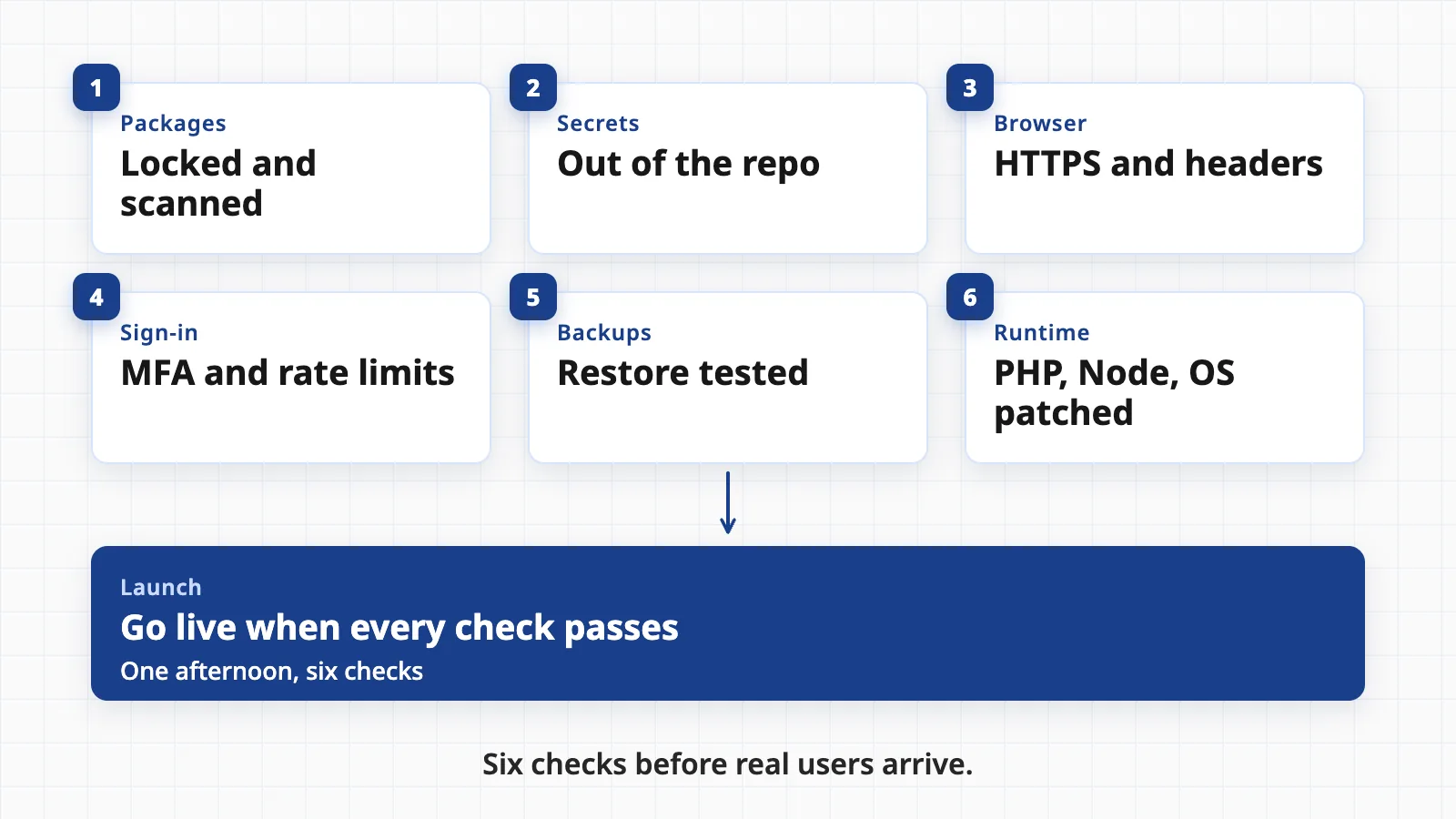
Print this, or paste it into your launch ticket. Each line maps to a section above.
- Dependencies are locked and scannedLockfile committed, builds install from it, a scanner runs on every build, and unused packages are removed.
- No secrets in the repository or its historyProduction keys are separate from test keys, stored outside the code, and anything ever committed has been rotated.
- HTTPS everywhereTLS 1.2 or 1.3 only, HTTP redirects with a 301, certificate renewal is automatic, HSTS is on.
- Security headers are setX-Content-Type-Options, Referrer-Policy and frame protection are live; CSP has run in report-only mode and been reviewed.
- Sign-in is hardenedMFA on every admin, hosting, domain and repository account; failed logins are throttled per account; breached passwords are blocked.
- Logging works and is safeLogins, access failures and admin actions are recorded; no passwords, tokens or card data appear in logs; someone gets an alert.
- Backups are automatic and restore has been tested3-2-1 in place, one copy offline or out of reach of your live credentials, and a recorded restore time.
- Runtime and server are patchedYou know the PHP, Node or Python version, who patches it, and how you will hear about fixes.
- Staging is closed and defaults are changedTest accounts, debug pages, sample data and default admin passwords are gone.
- Someone owns incidentsYou know who to call, where the logs are and how to take the site offline if you must.
For a small team, the whole list is a long afternoon for the first run, and a short one every time after. For a wider habit list beyond launch, see our guide to six cheap security habits for small businesses.
What this checklist does not cover: flaws in your own application logic, such as one customer being able to see another customer's data (the number 1 risk, Broken Access Control, on the OWASP list). Those need code review and testing against a standard like ASVS. If your app holds payment or health data, add that review before launch, not after.
Questions people ask
What security checks should I do before launching a website?
At minimum: lock and scan your dependencies, keep secrets out of the code repository, serve everything over HTTPS with HSTS and other security headers, require multi-factor authentication for admin accounts and limit login attempts, set up logging, take a backup and prove you can restore it, and make sure the server runtime (PHP, Node, the operating system) is patched.
What is the OWASP Top 10 and does it have a 2025 edition?
The OWASP Top 10 is a widely used list of the most critical web application security risks. A 2025 edition exists. It includes Broken Access Control at number 1, Security Misconfiguration at number 2 and Software Supply Chain Failures at number 3, and Mishandling of Exceptional Conditions at number 10.
Do security headers really matter?
They are cheap, quick hardening. HSTS tells browsers to use HTTPS only, X-Content-Type-Options stops browsers guessing file types, and Content-Security-Policy limits what scripts a page may load. They do not fix bugs in your code, so treat them as one layer, not a replacement for secure code.
What is the 3-2-1 backup rule?
Keep three copies of important data, on two different types of storage, with one copy off-site. CISA recommends it for small and medium businesses. Add a copy that ransomware cannot reach, such as an offline one, and test restoring it, because an untested backup may fail when you need it.
Is a framework update enough to patch my site?
No. A framework such as WordPress, Laravel or Express runs on a runtime (PHP, Node) and an operating system, and those are patched separately. The PHP2Shell flaws in October 2026 were in PHP itself, so updating the application did not fix them.
Want a second pair of eyes before you go live?
Geneki can run this checklist against your site or app, fix what it finds and set up the backups, headers and monitoring so they stay in place after launch.
Talk to usSources
- OWASP Top 10:2025
- A03:2025 Software Supply Chain Failures
- Application Security Verification Standard (ASVS)
- Widespread Supply Chain Compromise Impacting npm Ecosystem
- npm ci
- npm audit
- Secrets Management Cheat Sheet
- HTTP Headers Cheat Sheet
- Transport Layer Security Cheat Sheet
- Strict-Transport-Security header
- Content Security Policy (CSP)
- Authentication Cheat Sheet
- Logging Cheat Sheet
- Back Up Business Data
- Offline backups in an online world
- Backing up your data
- #StopRansomware Guide
- Critical security issue affecting PHP
This guide is general information, not security advice for your systems. Standards and tools change, so check the linked sources and test every change in a staging copy before you apply it to production.