The short version
- A penetration test is a scoped, time-limited attempt by people to break into your systems. It is not a scan, a red team exercise or a bug bounty, and the report should say which one you bought.
- A good report has an executive summary, a clear scope with dates, a method, findings with evidence, a risk rating for each, fixes you can act on, and a retest. If one of those is missing, ask for it.
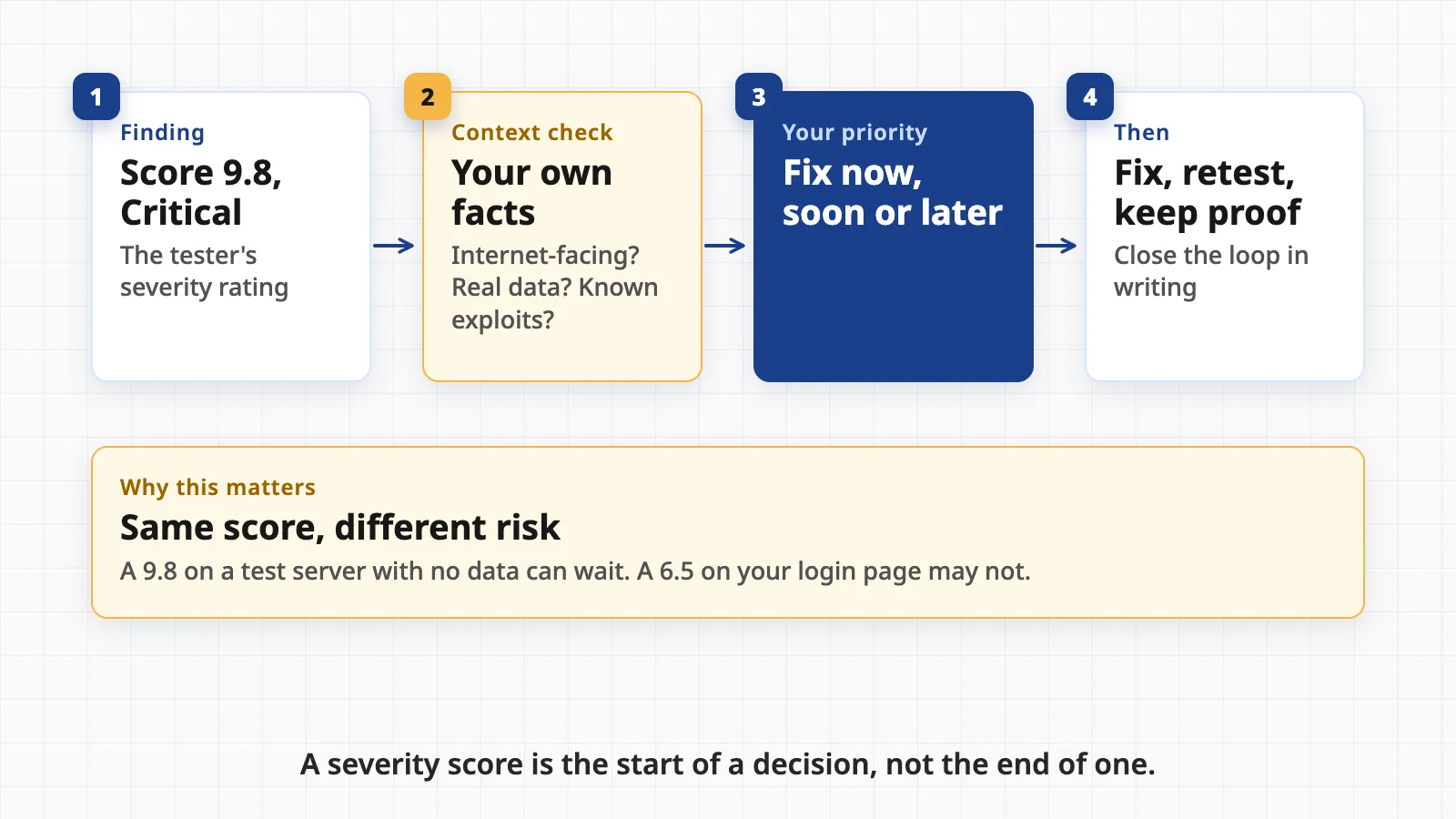
- A severity score such as CVSS says how bad a weakness can be in general. Your priority comes from adding your own facts: what is exposed, what data sits behind it and whether attackers are already using that flaw.
- Fix by real risk, retest what you fixed, keep the proof, and share a summary letter with customers rather than the full report.
Pen test, vulnerability scan, red team, bug bounty: which one did you buy?
The report only makes sense once you know what produced it. Four things get mixed up.
- Penetration test. The UK National Cyber Security Centre (NCSC) describes it as gaining assurance by "attempting to breach some or all of that system's security", using the tools and techniques an adversary might. NIST SP 800-115, the US government's 2008 guide to security testing, covers how such tests are planned and run, and NIST's glossary summarizes it as security testing in which evaluators "mimic real-world attacks".
- Vulnerability scan. An automated tool checks systems against a list of known weaknesses. The NCSC says scanning "cannot compare to manual processes such as penetration testing" for breadth and depth, but it is a cost-effective way to catch common issues often. Scanners can also report problems that do not exist, called false positives.
- Red team exercise. The NCSC calls this adversary simulation. It focuses on "the efficacy of an organisation's technical controls and detection", while a pen test is "more focused on identifying all technical vulnerabilities". A red team gets only minimal starting information, and its report shows how weaknesses were combined to reach a goal rather than listing every flaw. NIST's glossary adds that a red team's aim is to show the impact of successful attacks and what works for defenders.
- Bug bounty. A standing offer to pay outside researchers for valid vulnerability reports. It is continuous and open-ended, with no fixed report for you to read. It usually sits alongside a published disclosure policy: see the NCSC's Vulnerability Disclosure Toolkit. CISA's template notes that a basic disclosure policy does not promise payment, and that bounties are a separate, optional program.
A point in time: the NCSC warns that a pen test can only show that systems are not vulnerable to known issues "on the day of the test". A clean report is a snapshot, not a guarantee, which is why scanning, patching and retesting continue between tests.
The anatomy of a pen test report, section by section
Formats vary, but the community-maintained Penetration Testing Execution Standard (PTES) splits reporting into two parts for two readers: an executive summary for people who run the program and a technical report for the people who will fix things. The OWASP Web Security Testing Guide, a free manual for testing websites and APIs, also has a reporting section. Here is what each part should do for you.
- Executive summaryWhy the test was done, how it went overall, the overall risk, the headline findings and a prioritized plan. You should be able to read it in five minutes and know what to ask for budget for.
- Scope and datesWhich systems, apps and accounts were tested, what was excluded, who approved it and the test window. Without this you cannot tell what the clean parts really cover.
- MethodologyThe standards followed, such as PTES, the OWASP guide or NIST SP 800-115, and what the tester could see: no information, a normal user account, or full documentation.
- FindingsOne entry per problem: what it is, where it is, how it was found and what an attacker could do with it.
- EvidenceScreenshots, request and response samples or logs that prove the finding is real. PTES describes confirming vulnerabilities and showing the business impact, such as access to critical data.
- Risk ratingA severity for each finding and how it was decided. The NCSC says reports should rate each issue HIGH, MEDIUM, LOW or INFORMATIONAL, may add CVSS scores, and should document and justify any departure from a standard rating.
- RemediationA specific fix for each finding. The NCSC adds that you should not assume the suggested fix is the only option, since removing unneeded software or adding monitoring can also work.
- RetestA later check that the fixes worked, with results added to the report or issued as a short addendum.
Reading severity: a score is not your risk
Most reports use the Common Vulnerability Scoring System, or CVSS. The CVSS 4.0 specification from FIRST, the forum that maintains it, bands scores as None (0.0), Low (0.1 to 3.9), Medium (4.0 to 6.9), High (7.0 to 8.9) and Critical (9.0 to 10.0).
That number is a starting point. The base score describes the flaw itself, as seen by whoever maintains the affected software. FIRST says people who use CVSS "should enrich the Base metrics" with threat metrics, which reflect how attackers are using a flaw over time, and environmental metrics, which reflect your own controls and how important the asset is. It also describes the score as the severity of a flaw relative to other flaws, and places wider organizational factors outside CVSS's scope.
Two free sources help add that context.
- EPSS, the Exploit Prediction Scoring System, is a statistical model that estimates the probability that a published vulnerability will be exploited in the wild in the next 30 days. It applies to known, catalogued vulnerabilities (those with a CVE number). A flaw in your own custom code will not have one.
- The CISA Known Exploited Vulnerabilities catalog lists flaws that attackers have used in real attacks. CISA advises organizations to use it "as an input" to their prioritization, not as the whole process. A KEV listing moves a finding up your list quickly.
Your own facts do the rest. Is the system reachable from the internet? Does it hold customer data, payment details or the keys to other systems? Would the fix break something important?
A worked example: one finding, read line by line
This finding is invented for illustration. It does not describe a real client, and the score is a made-up figure to show the layout. Real reports differ in format but should carry the same elements.
- Title and ID: F-03, Password reset links can be reused. Plain, specific and numbered so you can track it.
- Severity: High, illustrative CVSS 7.5. Check that the report states how it arrived at the rating.
- Where: the customer portal, the password reset page, tested on the staging copy on the dates in the scope section.
- What the tester did: requested a reset link for a test account, used it once, then used the same link again an hour later. Both worked.
- Evidence: two request and response captures with timestamps, and a screenshot showing the second login.
- Impact: anyone who finds an old reset email, for example in a shared mailbox, could take over that account. The tester did not access real customer data.
- Fix: expire a reset link after one use and a short time, and invalidate older links when a new one is requested.
- Retest note: blank until the fix is deployed. Later it should say "Fixed, verified" with a date, or "Not fixed" with the new evidence.
Now apply your context. If the portal holds invoices and personal data and is on the internet, this goes near the top of your list. If the same flaw sat in an internal tool used by three people, you might schedule it. Either way, you can decide, because the report gave you evidence and a fix.
What a good report looks like, and the red flags of a weak one
The NCSC notes that test quality "depends heavily" on the skill of the testers, and for UK government and critical national infrastructure work it points to its CHECK scheme of assured providers. Outside those sectors you judge by the report. A good one reads like a clear account from someone who tried things and watched what happened. A weak one reads like a printout.
- Scope, dates and tester namedYou can tell what was tested, when and by whom, and what was left out.
- Every finding has proofEvidence a developer can reproduce, not just a title and a score.
- Impact in business termsWhat an attacker could reach, such as customer records, money or admin access.
- Fixes you can act onSpecific steps, with alternatives where the obvious fix is hard.
- Ratings explainedThe report says how severity was set, and why any score was changed.
- Positive results tooWhat was tested and held up, so you do not have to guess what was missed.
Red flags:
- Scanner output pasted in. Pages of tool logs with no human analysis suggest a scan sold as a pen test. The NCSC tells buyers of scanners to check how often they report problems that do not exist.
- No proof of exploitation. "May be vulnerable" is a scanner's phrase. A pen test should show what was actually done.
- No scope, dates or method. You cannot rely on a result you cannot place.
- Every finding is Critical, or none is. Both suggest ratings were not thought through.
- No retest offered. You will have nothing to show that fixes worked.
- Generic advice. "Apply patches" repeated on every page is not a recommendation.
Questions to ask the tester at the debrief
The NCSC says a debrief meeting with the testers is useful. Use it. Bring the people who will do the fixing, and ask:
- What would an attacker do first, and what could they reach in one day?
- Which three findings would you fix first here, and why?
- Which findings did you chain together to reach more than any one gave you alone?
- What did you not test, and what could not be tested in the time?
- Did you change anything, create accounts or leave test data behind that we should clean up?
- Which ratings did you adjust from the default score, and what was the reasoning?
- Can a developer ask you questions while fixing, and for how long?
- What does a retest cover, when can it happen and is it included in the price?
Triage, fix and retest: what to do in the weeks after
The NCSC is blunt that "risk assessment and decisions on the application of fixes are your responsibility", and that mitigation should not be left wholly to the test team. A simple routine:
- Sort every finding into three groupsFix now, fix on a date, or accept with an owner and a review date. Use the severity score plus your own context, and check KEV for anything with a known CVE.
- Give each item one owner and one dateA shared spreadsheet is enough. Findings with no owner are the ones that return in next year's report.
- Fix the cause, not just the exampleIf one form lacks a check, others may too. Ask the developer to look for the same pattern.
- Look at alternatives where a fix is hardThe NCSC lists removing unneeded software, adding other controls or increasing monitoring as options.
- Retest the fixesAsk the tester to confirm each one, and record the result against the finding.
- Keep the trailReport, ticket, change record and retest result, together. This is what you will show an auditor.
Questions people ask
How long should a penetration test report be?
Length is not quality. Short reports can be excellent if every finding has evidence and a fix, and long ones can be mostly pasted scanner output. Look for an executive summary a non-specialist can read in five minutes, a clear scope with dates, and findings that each stand on their own.
Is a vulnerability scan report the same as a pen test report?
No. A scan is automated and checks for known weaknesses. A pen test adds human testers who try to chain weaknesses together and prove what an attacker could reach. The UK NCSC says automated scanning cannot match manual testing for breadth and depth of coverage, and treats the two as complementary.
Should I fix every finding?
Not in the same week. Fix by real risk: what is exposed, what data sits behind it and whether the weakness is known to be exploited. Low and informational items can be scheduled, and some can be formally accepted with a named owner and a review date.
Do we need a retest?
If you want to say a problem is fixed, yes. A retest, usually a short and cheaper engagement, is where the tester confirms that each fix works and did not open a new hole. Ask about retests, and how long they are included, before you sign for the first test.
Can I show the full report to customers?
Usually not. A full report is a roadmap to your weaknesses, so most companies share a summary letter or attestation from the tester and give the full report only under a non-disclosure agreement, if at all. Check what your contract with the tester allows.
Holding a report and not sure where to start?
Geneki can read your pen test report with you, sort the findings by real risk, fix what is ours to fix and prepare the evidence a retest or a customer review will ask for.
Talk to usSources
- Penetration testing
- Adversary simulation: what you need to know
- Vulnerability scanning tools and services
- CHECK scheme: introduction
- Vulnerability Disclosure Toolkit
- Technical Guide to Information Security Testing and Assessment (SP 800-115)
- Glossary: penetration testing
- Glossary: red team
- Penetration Testing Execution Standard: Reporting (community mirror; the official pentest-standard.org site was unreachable when we checked)
- Web Security Testing Guide v4.2
- Common Vulnerability Scoring System v4.0: specification document
- Exploit Prediction Scoring System (EPSS)
- Known Exploited Vulnerabilities Catalog
- Vulnerability disclosure policy template
This guide is general information, not security, legal or compliance advice. Report formats, scoring practice and what customers or auditors accept vary by tester, framework and contract; check your own agreement and requirements. The example finding is invented for illustration and does not describe a real client or system.